|
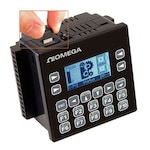
EZ Series Textpanels are Easy to Operate
EZ Series Text Panels and
EZ Series Text PLCs have been enhanced to
incorporate a vacuum fluorescent
display that has greater visibility as well
as a wider viewing angle.
Multi-Color Annunciator LED Lamps
The annunciator lamps on the EZ-220P
and EZ-220PV models are configured
similar to pushbuttons. Once you have
selected the starting address in the
PLC, all of the lamp colors will be
identified by the bit pairs. The color that
the lamp illuminates depends on the bit
assignment of the address selected.
256 User Programmable Messages
There are two message types which
can be displayed: local and PLC. Local
messages are displayed on the screen
unless the PLC triggers a PLC
message, which overrides a local
message.
PLC Message LED Indicator
When a PLC message is triggered, the
PLC Message LED will also be
illuminated. The PLC message LED will
remain on until the user acknowledges
the situation by pressing [esc] on the
panel.
SPECIFICATIONS
Enclosure: NEMA 4/4X Indoor
CPU Type: 8 bit
OS: Dedicated (non-Windows)
Service Power: 24 VDC (20-30 VDC) 4 - 8.5 Watts depending on model
Agency Approval: UL, CUL, CE
Op. Temp.: 0-45° C
Storage Temp.: -20 - 60° C
Humidity: 10-95% RH, non-condensing
Withstand Voltage: 1000 VDC 1 min.
Vibration: 5-55Hz, 2G for 2 hours
Shock: 10G under 12 ms
Electrical Noise: NEMA ICS 2-230 Showering Arc
No. of Messages: Up to 256
LED/LCD Life: 100,000 hours
Mounting: DIN
|
 |
|
 |
† All dollar amounts on this site are shown in US currency.
Ordering Example: (1) EZ-220 2 Line x 20 Character LCD TextPanel, $167, (1) EZ-SERIESEDIT-E Programming Software for EZ Series Text Enhanced, $28 , (1) EZ-SERIES-PGMCBL RS232 Programming cable for EZ Series Text Enhanced, $16, $167 +$28 + $16 = $211
|
|
 |
|
 |
|  |
 |
 |
 |
 |
 |
 |
 |
 |
 |
Related Links -
Related Products
|
 |
 |
 |
 |
 |
 |
|
 |
 |
|
|
Keywords:automation sequence control hmi mmi plc controller programmable motion ladder logic system scada industrial touch panel display screen operator interface analog digital i/o text panel
|
Back to top |
|